

Monday, September 21, 2009


Sunday, September 20, 2009
Smart Scan with MarketClub - Review
I often get emails or twits like, "How are you doing this?", "Who taught you how to trade?", and "What filters do you use when scanning?" etc.... Let's just say that, on average, I have to go through 1,000 - 2,000 charts a day (depending on the price range and volume) to look for high probability setups. It usually takes me about 2 hours to go through all the charts, review my picks, and select the GOLDEN setups. Given my busy schedules, sometimes I just do not have the energy, mood, or time to go through 2,000 charts. I know money (or sometimes MEGA FAST money) come from hard work. However, when you are working nearly full-time and being a full-time Day/Swing trader at the same time, things could get a little crazy sometimes.
Anyway, let's cut the crap. I recently started using this service called the MarketClub and I was amazed by what they have to offer. There are two tools that I like the most and they are the "Smart Scan" and the "Chart Trading Triangles".
At first glance, the Smart Scan service seems a bit average with a "nothing special feeling" to it. However, the "wow factor" came in when I dug a little deeper. After I set up my filters and pressed the Scan button, the tool generated a list of charts that I would consider as the High probability trades. Now if you have been reading my blog, you know how accurate and how "I am on FIRE" with my trading. I take trading very seriously and I love what I do.
I was given permission to reveal MarketClub's service. The following would be a step by step manual on how to setup the filter for scanning. I would also show you what kind of filter I would use with Smart Scan.
Step 1
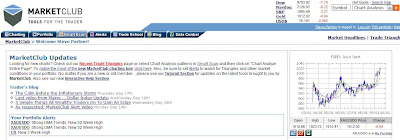
This would be the main page of Market Club once you have logged in.
Step 2
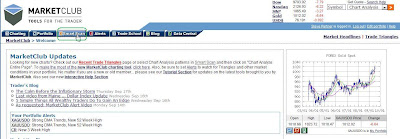
Click on the "Smart Scan" tab.
Step 3
Under the Smart Scan tab, you should be able to see a selection of Technical Indicators on the left side of the page and the Set Scan Filters on the right side of the page. You can choose any filters under the Set Scan Filters, such as types of chart, volume range, stock price range, stock exchange, and market. (See screen shots below)
Types of chart
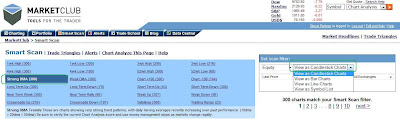
Market
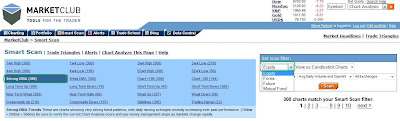
Price range
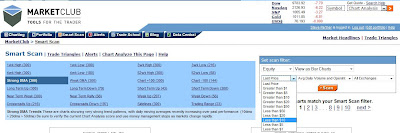
Volume range
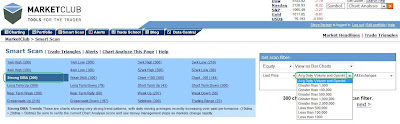
Stock Exchange
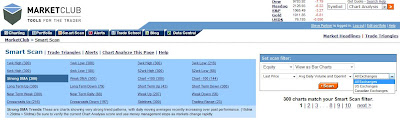
Here are my usual setups(filters)
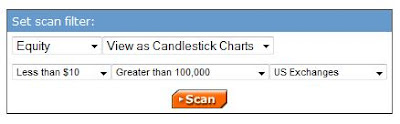
Make sure you click on (Strong DMA) under the technical indicators on the left side of the page. Click "Scan" after you selected your filters, a list of high probability stock charts will then be generated. I was surprised to see my "Overnight Positions buy list" showed up on the scan.
Now if you need help with the charts, I would be more than happy to help you draw them to understand the setups better. You can send me your stock symbols through Twitter (@Tradermarket247) or Email: Tradermarket247@gmail.com.
The second tool that I like with MarketClub is the Trade Triangles.This video does a great job on explaining how the Trade Triangle works. It also tells you why "Buy and Hold" no longer works or how "Buy and Hold" no longer outperform Day/Swing traders. In my case, I'm up over 100%+ for the year and this is just the beginning.
There are other useful tools on MarketClub such Portfolio, Alerts, Trade School (for beginners), Blog ,and Data central. Once you sign up, you will get a 30 day risk-free trial (Money Back Guarantee!). Let's put it this way, if you can't make a 10% gain within a month using this service or at least make your subscription money back within two weeks of trading (I made my money back the next day), I would then suggest you to cancel the service (30 day risk-free trial) because you have some serious trading education to go through. I am not a snake oil salesman, I have tested and used the program to help my trading; and I know what works and what doesn't. Now try the service and let's get moving. Most importantly, "Thank me later!".
Anyway, let's cut the crap. I recently started using this service called the MarketClub and I was amazed by what they have to offer. There are two tools that I like the most and they are the "Smart Scan" and the "Chart Trading Triangles".
At first glance, the Smart Scan service seems a bit average with a "nothing special feeling" to it. However, the "wow factor" came in when I dug a little deeper. After I set up my filters and pressed the Scan button, the tool generated a list of charts that I would consider as the High probability trades. Now if you have been reading my blog, you know how accurate and how "I am on FIRE" with my trading. I take trading very seriously and I love what I do.
I was given permission to reveal MarketClub's service. The following would be a step by step manual on how to setup the filter for scanning. I would also show you what kind of filter I would use with Smart Scan.
Step 1

This would be the main page of Market Club once you have logged in.
Step 2

Click on the "Smart Scan" tab.
Step 3
Under the Smart Scan tab, you should be able to see a selection of Technical Indicators on the left side of the page and the Set Scan Filters on the right side of the page. You can choose any filters under the Set Scan Filters, such as types of chart, volume range, stock price range, stock exchange, and market. (See screen shots below)
Types of chart

Market

Price range

Volume range

Stock Exchange

Here are my usual setups(filters)

Make sure you click on (Strong DMA) under the technical indicators on the left side of the page. Click "Scan" after you selected your filters, a list of high probability stock charts will then be generated. I was surprised to see my "Overnight Positions buy list" showed up on the scan.
Now if you need help with the charts, I would be more than happy to help you draw them to understand the setups better. You can send me your stock symbols through Twitter (@Tradermarket247) or Email: Tradermarket247@gmail.com.
The second tool that I like with MarketClub is the Trade Triangles.This video does a great job on explaining how the Trade Triangle works. It also tells you why "Buy and Hold" no longer works or how "Buy and Hold" no longer outperform Day/Swing traders. In my case, I'm up over 100%+ for the year and this is just the beginning.
There are other useful tools on MarketClub such Portfolio, Alerts, Trade School (for beginners), Blog ,and Data central. Once you sign up, you will get a 30 day risk-free trial (Money Back Guarantee!). Let's put it this way, if you can't make a 10% gain within a month using this service or at least make your subscription money back within two weeks of trading (I made my money back the next day), I would then suggest you to cancel the service (30 day risk-free trial) because you have some serious trading education to go through. I am not a snake oil salesman, I have tested and used the program to help my trading; and I know what works and what doesn't. Now try the service and let's get moving. Most importantly, "Thank me later!".
Overnight positions Chart updates.
ANAD

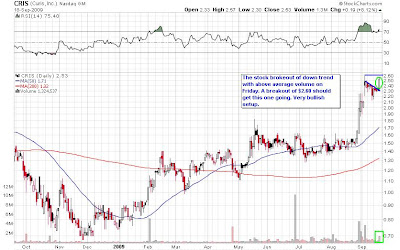
CRIS
CWSI

DSCM

DYAX

GBE

MVIS

NNBR

Stock Scan service review will be up in a few hours === Stay Tune.

CRIS

CWSI

DSCM

DYAX

GBE

MVIS

NNBR

Stock Scan service review will be up in a few hours === Stay Tune.
Saturday, September 19, 2009
Chart updates/ Smart Scan review
I will be updating overnight positions chartst omorrow and also posting a Smart Scan service review. You guys are going to love this.
Friday, September 18, 2009
Free Trading Courses
I always tell my followers to not "shadow trading or be a "blind follower"" unless you know the setups. I can recommend picks but you have to decide when to buy and when to sell, when to take profit or loss etc...
Anyway, here are some Free Email Trading Courses - compliments of INO.com and MarketClub. Try to learn as much as you can over the weekend because I'm going to reveal a service that I have been (testing/using) for the past two weeks to scan for high probability trades/setups.
Email me: Tradermarket247@gmail.com if you have any questions.
Have a great weekend guys.
Update: 6:40pm ET==========
Some of you told me that you want to learn technical trading but do not know where to start, what to learn, and how to scan good picks. Here are 7 great trading lesson videos I recommend watching over the weekend. The first one talks about breakouts and breakdown, which is something I use very often for day/swing trading. Learn those materials then you should be able to use a service that I will be showing you guys over the weekend to spot high probability trades.
Anyway, here are some Free Email Trading Courses - compliments of INO.com and MarketClub. Try to learn as much as you can over the weekend because I'm going to reveal a service that I have been (testing/using) for the past two weeks to scan for high probability trades/setups.
Email me: Tradermarket247@gmail.com if you have any questions.
Have a great weekend guys.
Update: 6:40pm ET==========
Some of you told me that you want to learn technical trading but do not know where to start, what to learn, and how to scan good picks. Here are 7 great trading lesson videos I recommend watching over the weekend. The first one talks about breakouts and breakdown, which is something I use very often for day/swing trading. Learn those materials then you should be able to use a service that I will be showing you guys over the weekend to spot high probability trades.
Overnight positions:
LONG: anad cris dscm dyax gbe mvis nnbr cwsi
SHORT: stec sva
Your choice folks! Have a great weekend!
Will update charts on Sunday!
SHORT: stec sva
Your choice folks! Have a great weekend!
Will update charts on Sunday!
$MPG intraday update

Forming a ST. See which way it breaks. Will add if it breaks out of $1.80 with volume.
$MCGC intraday update

Watch $3.63 breakout with volume. Get out if it breaks below the bottom trend-line (remember you can always get back into a stock, so respect the chart).


$ARNA to watch!
The stock Gap up Afterhour because of FDA news. (Arena Pharma says weight-loss trial meets goals)

Update 7:58am ET ==============
Woah! The stock went from $6.68 to now $4.00.

Update 7:58am ET ==============
Woah! The stock went from $6.68 to now $4.00.
Thursday, September 17, 2009


Overnight positions!
LONG: BEE KFN MOVE
SHORT: STEC SVA
Good luck folks! (Will update charts tonight or before market opens.)
Update: 4:17pm ET===============
SHOOT! - Forgot about $ABR grab some AH(After-Hour) if you can. It should gap up tomorrow.
SHORT: STEC SVA
Good luck folks! (Will update charts tonight or before market opens.)
Update: 4:17pm ET===============
SHOOT! - Forgot about $ABR grab some AH(After-Hour) if you can. It should gap up tomorrow.
The $CVGI Prediction
I drew this chart back in July 31, 2009. Comment about $CVGI going to $8.00 at that time the stock was at $2.00 at the time. The stock is trading at $7.09 as of today Sep 17, 2009.
POWER OF TA LIVES~~!!
JULY 31

Today SEP 17

POWER OF TA LIVES~~!!
JULY 31

Today SEP 17


$MBI intraday update

Forming a descending triangle, it's very critical which way the stock breaks from here.
I would get in if it test intraday highs again.

Intraday update $PIR $ABR

$ABR Strong volume todya, a break above $2.50 should ge tthis one going.

$PIR trying to break out of ST(symmetrical triangle). A break above $3.30 should be good to go.


Wednesday, September 16, 2009
Pick of the day.

Sent out alert on $DAC at $4.80 today. The stock topped out at $6.19.
Why $DAC?
1) Rounding base breakout.
2) Huge Volume
3) Price follows
Something you always want to look for in a BTFO (Break The Fxxk Out) stock. Hope you guys banked today.
Education video about the dollar index:
A great educational video that covers the technical setups of the Dollar index.
Since much of our recently rather were driven by commodities due to weak USD. It's good to pay attention on the Dollar Index. Hope you guys enjoy.
I will update charts tonight.
Since much of our recently rather were driven by commodities due to weak USD. It's good to pay attention on the Dollar Index. Hope you guys enjoy.
I will update charts tonight.


Tuesday, September 15, 2009


Monday, September 14, 2009
Overnight positions!
If you have been following me on twitter, and traded my picks. You should be banking coins today!
keeping a 5% positions on $CNO and the rest in cash!
update===
Bought 5% ICO too.
keeping a 5% positions on $CNO and the rest in cash!
update===
Bought 5% ICO too.
$DAN intraday update

Will watch that $6.00 level. A break above $6.00 with volume is a buy! Thanks for the heads-up Gordon!

Subscribe to:
Posts (Atom)


